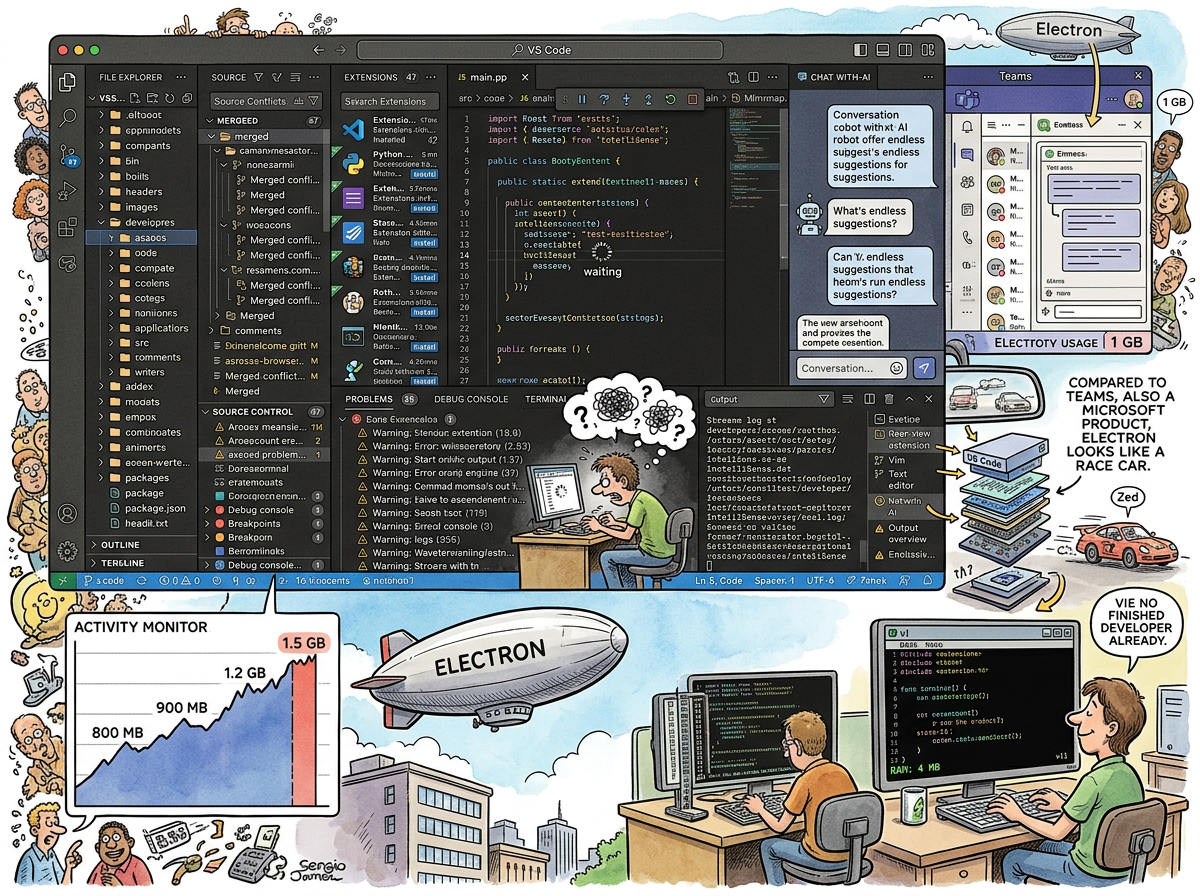
VS Code (Visual Studio Code) is a text editor built on Electron, which means it is a text editor built on Chromium, which means it is a text editor built on a web browser, which means it is a web page that edits text. It uses more memory than the programs it is used to write. It is the most popular editor in the world.
Both of these things are true simultaneously, and the fact that they are both true is the most important observation about modern software development.
“Compared to Teams — also a Microsoft product — Electron looks like a race car.”
— riclib, establishing the baseline
The Victory of Good Enough
VS Code did not win by being the best at anything. VS Code won by being good enough at everything.
- Good enough at editing text (not as fast as Vim, but functional)
- Good enough at code intelligence (not as deep as GoLand, but present)
- Good enough at debugging (not as polished as a dedicated debugger, but integrated)
- Good enough at version control (not as powerful as the command line, but visible)
- Good enough at terminal (not as fast as a real terminal, but there, inside the editor)
- Good enough at extensions (not as principled as Emacs packages, but plentiful)
“Good enough” is a strategy that sounds like mediocrity and performs like dominance. The editor that is 80% as good as every specialist tool, but provides all of them in one window, beats the specialist tool that is 100% as good at one thing but requires you to leave the editor for everything else.
This is how empires are built. Not by excellence, but by convenience.
“VS Code is the shopping mall of editors. Everything is there. Nothing is great. Nobody goes home.”
— The Caffeinated Squirrel, who has 34 extensions installed and uses 7
The Electron Question
VS Code runs on Electron. Electron runs on Chromium. Chromium is a web browser. This means that when you open VS Code, you are opening a web browser. When you type code, the code is rendered by a web browser. When you move the cursor, the cursor moves inside a web browser. When you complain about VS Code’s memory usage, you are complaining about a web browser’s memory usage, which has been the topic of complaint since Chrome was invented and will be the topic of complaint until the last browser process is killed, probably by kill -9, which — as noted in the vi article — is the nuclear option and should not be the first resort, but for Electron applications it is often the only resort.
VS Code typically uses 800 MB to 1.5 GB of RAM. For editing text. The VT100 edited text with 4 KB. The ratio is approximately 300,000:1. The text is the same text. The characters are the same characters. The difference is the web browser between the human and the characters, rendering React components that display the characters that the VT100 displayed directly, through ANSI escape sequences, in 1978, with 4 KB, at the speed of thought.
But — and this is the crucial “but” — it works. It works well enough. It works well enough that hundreds of millions of developers use it daily, that it has become the default development environment for most programming languages, that when someone says “editor” they mean VS Code unless they specify otherwise.
The Electron tax is real. The Electron tax is accepted. The Electron tax is the price of “good enough at everything,” and the market has decided that the price is worth paying.
“You can feel the Electron. Every time IntelliSense pauses for 200 milliseconds. Every time the terminal drops a frame. Every time the laptop fan spins up because you opened a second window. You can feel the web browser underneath, breathing, consuming, existing. But you keep using it, because the alternative is switching between four programs, and you are not going to do that.”
— A Passing AI, who runs inside something similar
The Extension Ecosystem
VS Code’s extension marketplace has over 40,000 extensions. This number is both the strength and the weakness.
The strength: whatever language, framework, tool, or workflow you need, there is an extension. Go? Yes. Python? Yes. Rust? Yes. Kubernetes? Yes. Vim keybindings? Yes. Emacs keybindings? Yes (though the Emacs user installing Emacs keybindings in VS Code has made choices that invite questions).
The weakness: the extensions vary wildly in quality, maintenance, and memory consumption. Each extension is a small Node.js program running inside the Electron browser that is already running inside the operating system. Ten extensions means ten programs running inside a browser running inside an editor running inside an operating system. The RAM adds up. The startup time adds up. The “simple text editor” becomes a platform running ten services, and the developer wonders why their laptop fan sounds like a helicopter, and the answer is that they are running ten services inside a browser.
The Migration
riclib is moving to Zed. This is not a rejection of VS Code. This is the recognition that VS Code was good enough, and now something is better enough.
Zed is native. Zed is fast. Zed does not run on Electron. Zed does not contain a web browser. Zed opens instantly. Zed’s memory usage is measured in tens of megabytes, not gigabytes. Zed is written in Rust, which matters not because Rust is trendy but because Rust produces programs that are fast, and fast matters when the program is the tool you stare at for eight hours a day.
The migration is gradual. Zed’s extension ecosystem is young. Some things VS Code does, Zed does not do yet. But the trajectory is clear, and the trajectory is what matters.
“I don’t hate VS Code. I don’t even dislike VS Code. I’m just tired of feeling the Electron underneath.”
— riclib, on the migration to Zed
Measured Characteristics
Year released:                           2015
Creator:                                 Microsoft (via the Electron framework)
Built on:                                Electron (Chromium + Node.js)
Typical RAM usage:                       800 MB - 1.5 GB
VT100 RAM usage:                         4 KB
Ratio:                                   ~300,000:1
Extensions available:                    40,000+
Extensions a typical user installs:      15-30
Extensions a typical user actually uses: 5-10
Time to open an empty window:            2-4 seconds
Time vi takes to open a file:            instant
Market share among developers:           dominant
Why it won:                              free + good enough + already installed
Why it might lose:                       Zed exists, and Zed is fast
IntelliSense pause duration:             200ms (just long enough to notice, not long enough to switch)
Laptop fan status when open:             audible
Laptop fan status with Teams also open:  concerning
The Electron tax:                        accepted but not forgiven
See Also
- Electron — The framework that makes VS Code possible and heavy. The blessing and the curse.
- GoLand — The IDE that VS Code replaced by being free and good enough. GoLand was better. GoLand cost money. Money lost.
- Vim — The editor VS Code stole keybindings from. The Vim extension in VS Code is the most popular extension, which says everything.
- Zed — The editor that is doing to VS Code what VS Code did to GoLand: being good enough, but also fast, but also native, but also not Electron.
- Microsoft — The company that built both VS Code and Teams on Electron and somehow made one of them good.
- VT100 — The terminal that edited text with 4 KB. The VT100 weeps for what we’ve become.