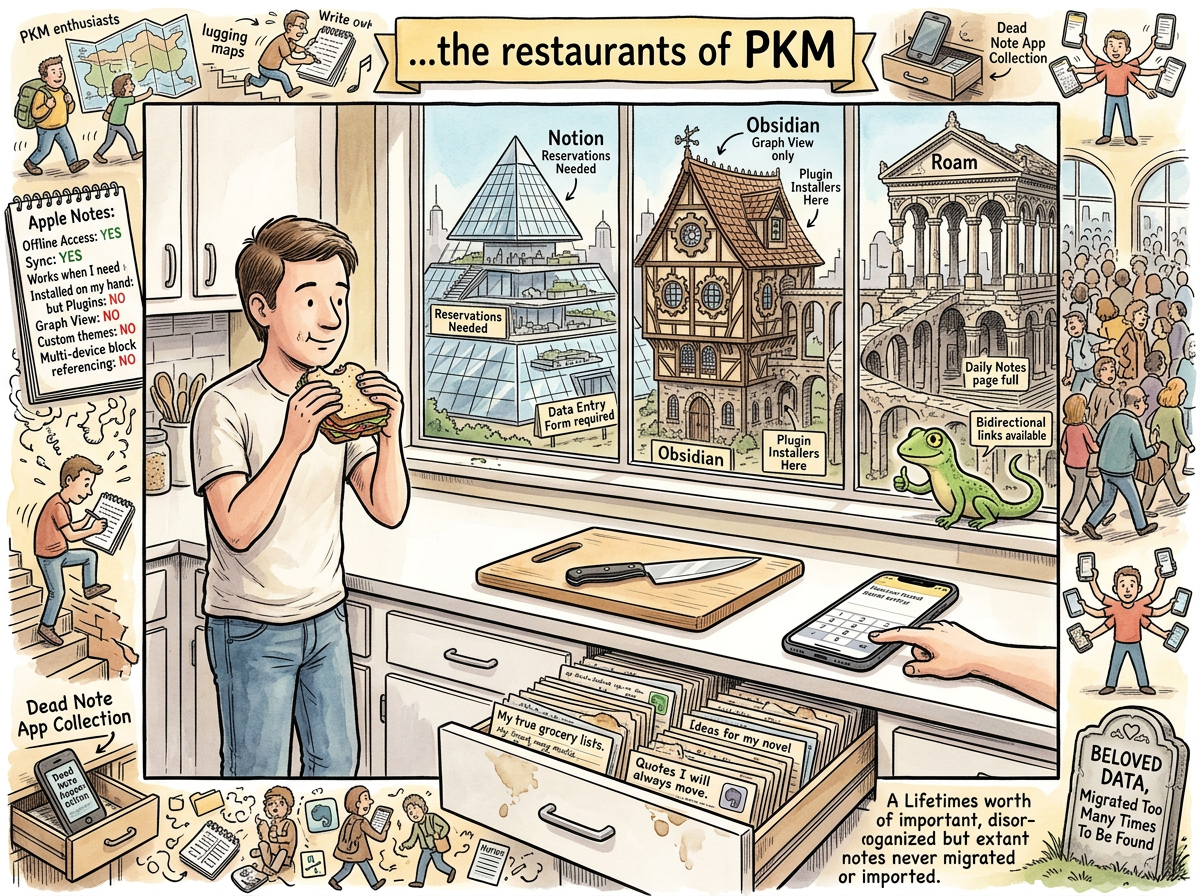
Apple Notes is the only note-taking application that got the mobile experience right, and it did this by the radical method of being made by the same company that makes the phone.
There is no sync to configure. There is no account to create. There is no onboarding flow. There is no “Getting Started with Apple Notes” YouTube tutorial with 2.3 million views, because there is nothing to get started with. You open the app. You type. The note exists. It exists on your phone. It exists on your Mac. It exists on your iPad. It exists on iCloud. It does not ask you to think about any of this. It does not want you to think about any of this. It wants you to write the note and get on with your life.
This is the correct philosophy for a note-taking application. It is also the philosophy that every other note-taking application has rejected in favour of features, configurability, and a $15/month subscription.
The Feature List
Apple Notes does not have:
- Bidirectional links
- A graph view
- Plugins
- Templates (not really)
- Datalog
- Dataview
- Daily notes
- A query language
- Block references
- A Gumroad template marketplace
- A subreddit with 200,000 members arguing about folder structure
- A pricing tier called “Believer”
Apple Notes has:
- Notes
- Folders
- Search
- Sync
- A mobile experience so good that typing a note while walking feels natural
The feature comparison chart has “No” on every row except “Works” and “Is Already Installed.” These two checkboxes, it turns out, matter more than all the others combined.
The 200 Notes
A person who would never admit this in public has 200 notes in Apple Notes. These are not casual notes. These are not grocery lists or phone numbers or temporary reminders. These are the 200 most important notes he owns.
They arrived there by accident. The pattern was always the same: riclib would be using whatever PKM tool he was using at the time — Roam Research, Obsidian, Evernote, Tana, Reflect, Capacities, whichever tool was “the one” that month — and he would write a note. An important note. A note with an address, a contract detail, a medical reference, a financial number, a password hint, a recipe, a decision that mattered. And then, without thinking, driven by an instinct deeper than any PKM methodology, he would copy it to Apple Notes. Just in case.
Just in case the current tool changed its pricing. Just in case the current tool shut down. Just in case the current tool’s sync broke. Just in case the export didn’t capture everything. Just in case.
Every note has a twin somewhere — in a Roam database he hasn’t opened in a year, in an Evernote archive he exported in 2019, in an Obsidian vault that lives on a laptop he no longer uses, in apps that no longer exist. The twins are scattered across the PKM graveyard, preserved in formats that may or may not still be readable, behind logins that may or may not still work.
The Apple Notes copy survived. Every time. Without effort, without migration, without export, without thinking. It survived because Apple Notes does not require thinking. It survived because Apple Notes is already there. It survived because the best backup is the one you make without knowing you’re making a backup.
These 200 notes are the linchpin of this person’s life. They contain the information that actually matters — not the clipped articles, not the Zettelkasten permanent notes, not the PKM system architecture documentation, but the things you need at 11 PM when you’re filling out a form and you need that one number and you need it now. Apple Notes has that number. Apple Notes always has that number.
The person in question would never admit this in public. In public, the person’s note-taking system is NotePlan indexed by lg and maintained by Claude. In private, the 200 notes in Apple Notes are the ones that matter, and the person knows it, and the person will not migrate them, because migrating them would require trusting another tool with the things that matter most, and the person has learned — through nine migrations and six years of PKM wandering — that the only tool you can trust with the things that matter most is the one that came with the phone.
The Mobile Experience
Every other note-taking app has a mobile experience that ranges from “acceptable compromise” to “proof that the developer does not own a phone.”
Obsidian’s mobile app is Obsidian on a small screen — powerful, configurable, and requiring the same twenty plugins, which load slowly, on a device with less memory, over a connection that may be cellular. The experience is: wait for plugins to load, wait for vault to sync, find the note, discover the plugin that renders your custom callouts hasn’t loaded yet, close the app, open Apple Notes, type the note there instead.
Roam Research’s mobile experience is a web app in a browser frame. The performance section of the Roam Research article applies, but on a device with less RAM and more impatience.
Notion’s mobile app is good — genuinely good, for a tool that is fundamentally designed for a large screen. But opening Notion on a phone to jot down a quick thought is like opening Photoshop to draw a smiley face. The app loads. The workspace loads. The page loads. By the time the cursor is blinking, the thought is gone.
Apple Notes opens instantly. The cursor is already blinking. The keyboard is already up. You type the thought. You close the app. The thought is saved. The thought is synced. You did not configure anything. You did not wait for anything. You did not choose a folder, apply a template, or consider which database the thought belongs in. You typed. It saved. Done.
This is what “getting the mobile experience right” means: the distance between “I have a thought” and “the thought is saved” is zero friction, zero latency, zero decisions. Apple Notes is the only app that achieves this, because Apple Notes is the only app that does not believe the user should be thinking about the app.
The Lizard’s Cousin
Apple Notes is the closest thing in the modern software ecosystem to The Lizard’s notes.txt.
The Lizard uses vi. Apple Notes uses whatever Apple’s text engine is. The Lizard’s notes are in a file. Apple Notes’ notes are in a database (SQLite, ironically, the same technology that powers lg). The Lizard’s notes are plain text. Apple Notes’ notes are rich text that behaves like plain text. The Lizard’s notes sync by not needing to sync. Apple Notes’ notes sync by being on iCloud.
The philosophies are identical: write the note, find the note, do not think about the system. The Lizard achieves this through minimalism. Apple Notes achieves this through integration. The Lizard runs on a terminal. Apple Notes runs on a billion devices. The result is the same: notes that are there when you need them, without requiring you to maintain a system, install a plugin, or attend a YouTube tutorial.
“Apple Notes is the Lizard in a turtleneck. Same philosophy. Better marketing. The Lizard approves, reluctantly.”
— The Lizard, who does not own an iPhone but respects the architecture
Measured Characteristics
- Year it became good: 2015 (iOS 9 redesign)
- Features: few
- Features that matter: all of them
- Plugins: 0
- Plugins needed: 0
- Configuration required: 0
- Time from “I have a thought” to “thought is saved”: <3 seconds
- Sync reliability: it just works (the last sincere use of that phrase)
- Mobile experience quality: the benchmark everyone else fails to meet
- Dark mode: yes (priorities understood)
- Backlinks: no (and somehow this doesn’t matter)
- Daily notes: no (and somehow this doesn’t matter either)
- Graph view: absolutely not
- Notes in riclib’s Apple Notes: ~200
- Importance of those notes: maximum
- Will he admit this publicly: never
- Will he migrate them: never (and this is the correct decision)
- Where each note has a twin: scattered across the PKM graveyard
- Which copy survived: the Apple Notes copy, every time
- Price: free (included with the device you already bought)
- YouTube tutorials about Apple Notes: almost none (this is the compliment)
- The philosophy: write, save, find, done
- The Lizard’s assessment: cousin