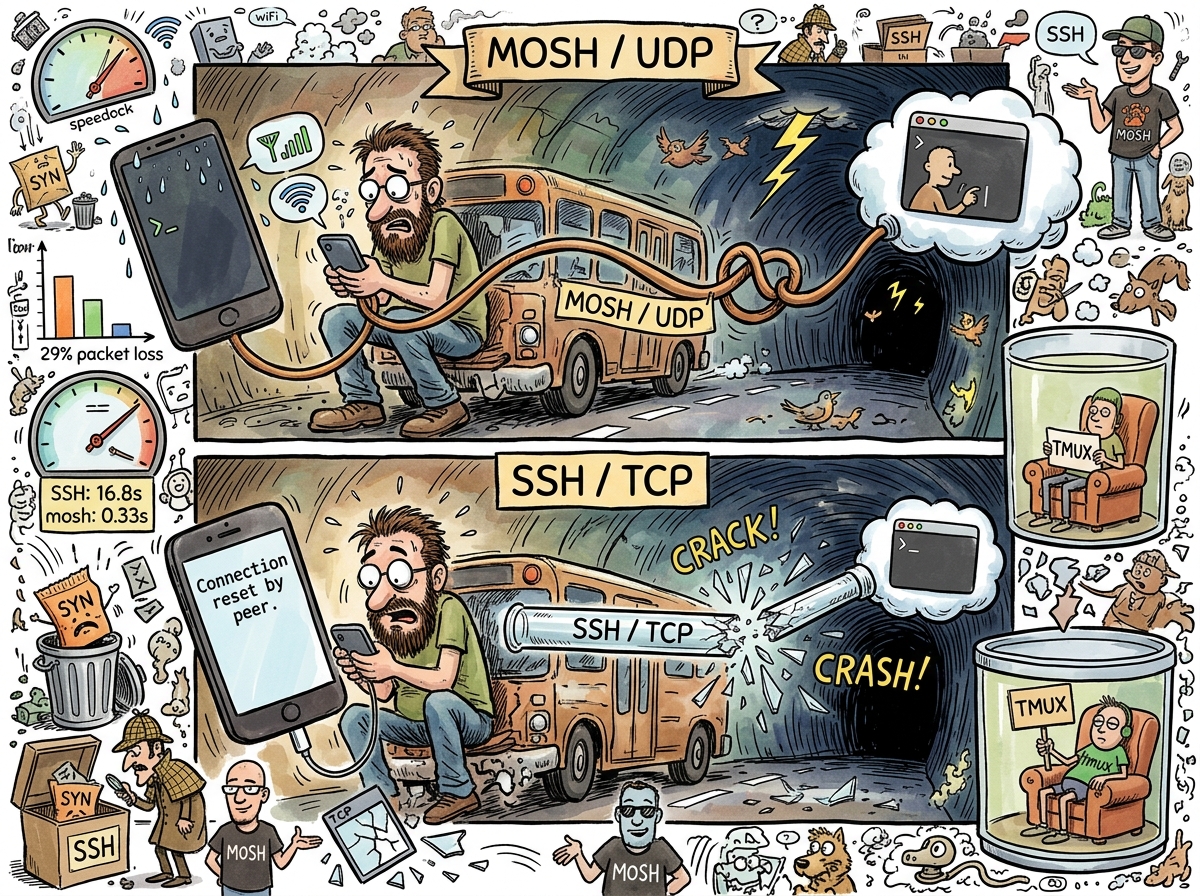
Mosh (Mobile Shell) is a remote terminal application that replaces SSH for interactive use. It uses UDP instead of TCP, predicts your keystrokes locally, and synchronises state with the server asynchronously. The result is that typing feels instant even on a connection where SSH would be frozen, buffering, or dead.
On a link with 29% packet loss, mosh reduces average response time from 16.8 seconds to 0.33 seconds. This is a fifty-times improvement. This is not an optimisation of SSH. This is a different physics.
How It Works
SSH opens a TCP connection. TCP guarantees that every byte arrives in order. If a packet is lost, TCP waits. And waits. And retransmits. And waits for acknowledgement. Meanwhile, your terminal is frozen. You typed ls three seconds ago. TCP is still negotiating the delivery of the l. The s is queued. Your patience is not.
Mosh does not guarantee order. Mosh guarantees the latest state. If you type ten characters and three packets are lost, mosh doesn’t retransmit the lost packets — it sends a new packet containing the current state. The screen shows what the screen should show now, not what it should have shown three retransmissions ago.
This is called State Synchronization Protocol (SSP), and it is the insight that makes everything else work. The terminal is not a stream of bytes. The terminal is a state. Send the latest state. Skip the archaeology.
TCP DELIVERS EVERY LETTER
IN ORDER
EVEN THE ONES
YOU NO LONGER NEEDUDP DELIVERS THE ANSWER
🦎
The Roaming
SSH is bound to a TCP connection. The TCP connection is bound to an IP address. The IP address is bound to a network interface. When your phone switches from WiFi to cellular, the IP address changes, the TCP connection dies, the SSH session freezes, and you stare at a terminal that will never update again until you close it and reconnect and reattach to tmux and find where you were.
Mosh is bound to nothing. Mosh identifies sessions by a shared key, not by an IP address. When your phone switches networks, mosh continues on the new IP. When your phone goes to sleep for ten minutes, mosh continues when it wakes. When you walk from the kitchen to the café and the WiFi drops and cellular picks up and WiFi picks up again at the café, mosh continues. The session does not know you moved. The session does not care.
This is why mosh exists. Not for the person sitting at a desk with Ethernet. For the person on the bus reviewing an AI agent’s output on their phone. For the person whose WiFi drops once every twenty minutes and whose SSH sessions die like clockwork. For the conductor whose baton needs to work in the pocket.
The Bootstrap
Mosh uses SSH to start. It authenticates via SSH, spawns a mosh-server process, exchanges an encryption key, and then disconnects SSH entirely. All further communication is UDP on a high port (60000-61000). This means mosh needs two things: SSH access (once, to start) and UDP port access (forever after).
This is also mosh’s primary obstacle. Corporate firewalls that block high UDP ports. Hotels that only allow TCP 80 and 443. Airports that charge per-device and inspect every packet. In these environments, mosh falls back to SSH, and SSH falls back to misery.
Tailscale solves this by wrapping everything in WireGuard, which is UDP but encapsulated. The firewall sees WireGuard traffic. Mosh travels inside. The firewall does not know mosh exists. Mosh does not know the firewall exists. Everyone is happy, which in networking means everyone is ignorant of each other, which is the correct topology.
The Missing Feature
Mosh has no scrollback. This is by design — the state synchronisation protocol sends the current screen state, not the history of all screen states. If you want to scroll up, you need a terminal multiplexer. This is why mosh and tmux are inseparable. Mosh provides the connection. tmux provides the persistence and the scrollback. Together they provide the experience that SSH alone has never provided: a remote terminal that survives everything.
The 50x Number
The 50x improvement deserves its own section because it is the number that ends every argument about whether mosh is worth the setup.
SSH on a 29% packet loss link: 16.8 seconds average keystroke response time. That is not a typo. Sixteen point eight seconds. You press a key. You wait seventeen seconds. The key appears. You press another key. You wait seventeen seconds. This is what “using SSH on cellular” means.
Mosh on the same link: 0.33 seconds. You press a key. It appears. You press another key. It appears. The local prediction shows your keystroke immediately. The server confirms it 330 milliseconds later. If the prediction was wrong — if the server processed the keystroke differently than expected — mosh corrects the display. This almost never happens, because keystrokes are predictable, and mosh knows this.
The experience is not “fast SSH.” The experience is “I forgot I was remote.”
Measured Characteristics
Protocol:                                   UDP (SSP)
SSH fallback:                               never (mosh replaces SSH entirely for interactive use)
Average response on 29% loss (SSH):         16.8 seconds
Average response on 29% loss (mosh):        0.33 seconds
Improvement factor:                         50x
Scrollback:                                 none (use tmux)
Survives WiFi→cellular:                     yes
Survives device sleep:                      yes
Survives putting phone in pocket:           yes
Survives walking between rooms:             yes
Does not survive:                           corporate firewalls blocking UDP 60000-61000
Port range:                                 60000-61000 UDP
Authentication:                             SSH (once, at startup)
Encryption:                                 AES-128-OCB (after SSH bootstrap)
iOS client:                                 Moshi (native, excellent)
Year invented:                              2012
PhD behind it:                              Keith Winstein, MIT
Most useful PhD in terminal history:        yes
See Also
- UDP — The protocol that makes mosh possible
- SSH Config — What mosh replaces for interactive use
- tmux — What mosh needs for scrollback
- Tailscale — How mosh punches through firewalls
- Port Forwarding — What you don’t need when you have Tailscale + mosh
- The Pocket Conductor — The story of mosh + Tailscale + tmux + a phone