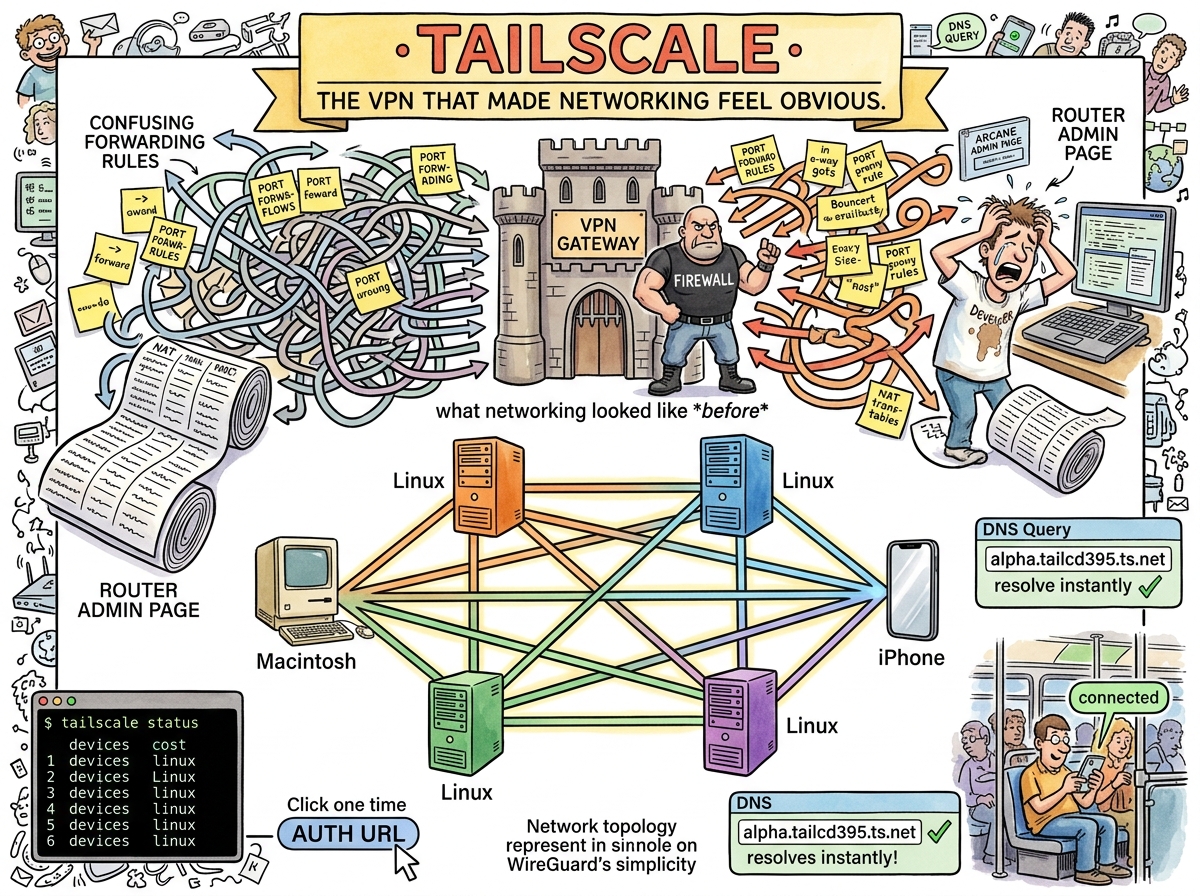
Tailscale is a mesh VPN built on WireGuard that makes every device on your network reachable from every other device, regardless of where they are, what NAT they’re behind, or how many firewalls are between them. It accomplishes this by doing the thing that networking has always been able to do but that thirty years of NAT, firewalls, and enterprise security theatre have made feel impossible: giving every device an IP address and letting them talk.
This is not innovation. This is restoration. The internet was designed for every device to be reachable. Then NAT happened. Then firewalls happened. Then VPNs happened (the old kind, the kind that route all your traffic through a corporate gateway in Virginia so you can SSH into a machine in the next room). Tailscale undoes thirty years of damage in one tailscale up.
The Setup
sudo tailscale up --ssh
One command. The device joins a WireGuard mesh. It gets a stable IP (100.x.x.x). It gets a DNS name via MagicDNS. If --ssh is passed, Tailscale handles SSH authentication using your identity provider — no key management, no authorized_keys, no “wait, which key is on which machine.”
The experience of setting up Tailscale on four OrbStack VMs was:
- Install Tailscale on each VM
- Run
sudo tailscale up --ssh --hostname=alpha - Click an auth URL
- Done
Four VMs. Four auth URLs. Zero configuration files. Zero port forwarding rules. Zero firewall exceptions. The VMs were reachable from an iPhone in a pocket.
THE NETWORK WAS ALWAYS THERE
NAT HID IT
FIREWALLS LOCKED IT
TAILSCALE FOUND THE KEYTHE KEY WAS WIREGUARD
THE LOCK WAS NEVER NECESSARY🦎
MagicDNS
When a device joins a Tailscale network, it gets a DNS name: hostname.tailnet-name.ts.net. No /etc/hosts. No DNS server configuration. No “what was the IP of alpha again?”
tailscale status

100.64.59.2     libultra-758  macOS
100.73.83.44    alpha         linux
100.93.190.124  beta          linux
100.80.113.125  delta         linux
100.106.13.75   gamma         linux
100.123.213.81  iphone182     iOS
Six devices. One mesh. The iPhone can mosh directly into any VM. The Mac can SSH into any VM. The VMs can reach each other. No one configured a router. No one opened a port. No one drew a network diagram. The network diagram is tailscale status.
What It Replaced
Before Tailscale, connecting a phone to a development VM behind NAT required one of:
- Port forwarding — mapping external ports to internal IPs on the router, praying the ISP doesn’t block them, configuring dynamic DNS when the public IP changes, and accepting that your development VM is now visible to every port scanner on the internet
- SSH jump hosts —
ProxyJumpthrough an intermediate server, which works for SSH but not for Mosh, because mosh uses UDP and SSH tunnels are TCP - Cloudflare Tunnel — TCP-only, which means mosh doesn’t work, which means the entire reason you wanted the connection (surviving lossy mobile networks) is defeated by the transport layer
- A VPN (the old kind) — route all traffic through a gateway, configure certificates, maintain a server, update the server, patch the server, wonder why the server is down
Tailscale replaced all of these with a binary and a login.
The Cloudflare Question
When asked “does Cloudflare have something like Tailscale SSH?”, the answer is: yes, Cloudflare Tunnel exists, but it’s TCP-only. This is the dealbreaker. Mosh requires UDP. UDP is the reason mosh survives cellular handoffs. TCP is the reason SSH doesn’t. Choosing Cloudflare Tunnel for a mobile-first setup is like buying waterproof boots and then walking through the river in sandals because the sandals were on sale.
Tailscale uses WireGuard, which is UDP-native. Mosh over Tailscale works. The conductor’s phone stays connected when the WiFi drops, when the elevator has no signal, when the train enters a tunnel. The connection survives because UDP doesn’t pretend packets are reliable — it lets the application handle loss, and mosh is very good at handling loss.
The Squirrel’s Complaint
THE SQUIRREL: “Where’s the admin console? The monitoring? The access control policies? The audit logs?”
Tailscale has all of these. They exist. They are at login.tailscale.com/admin. They were not mentioned because they were not needed. The four VMs were added. They work. The phone can reach them. The admin console is there for the day someone needs it, which is not today.
The Squirrel’s complaint is not that Tailscale lacks features. The Squirrel’s complaint is that Tailscale’s features are invisible until needed, which means the Squirrel cannot tour them, which means the Squirrel cannot propose improvements to them, which is the Squirrel’s primary source of joy.
Measured Characteristics
Commands to join the mesh:                  1 per device
Auth method:                                click a URL
Time from install to reachable:             ~2 minutes
Port forwarding rules replaced:             all of them
Jump hosts replaced:                        all of them
VPN gateways replaced:                      all of them
DNS configuration required:                 none (MagicDNS)
SSH key management required:                none (--ssh flag)
Certificate management required:            none (WireGuard keys)
Protocol:                                   WireGuard (UDP)
Mosh compatible:                            yes (this is why it won)
Cloudflare Tunnel mosh compatible:          no (this is why it lost)
Devices on riclib's tailnet:                6
Configuration files edited:                 0
Network diagrams drawn:                     0
  (network diagram is `tailscale status`)
See Also
- Mosh — The protocol that needs UDP, which is why Tailscale won and Cloudflare lost
- Port Forwarding — The thing Tailscale replaced
- SSH Config — The file that got simpler after Tailscale
- OrbStack — The VMs that Tailscale made reachable
- The Pocket Conductor — The story of six devices joining one mesh