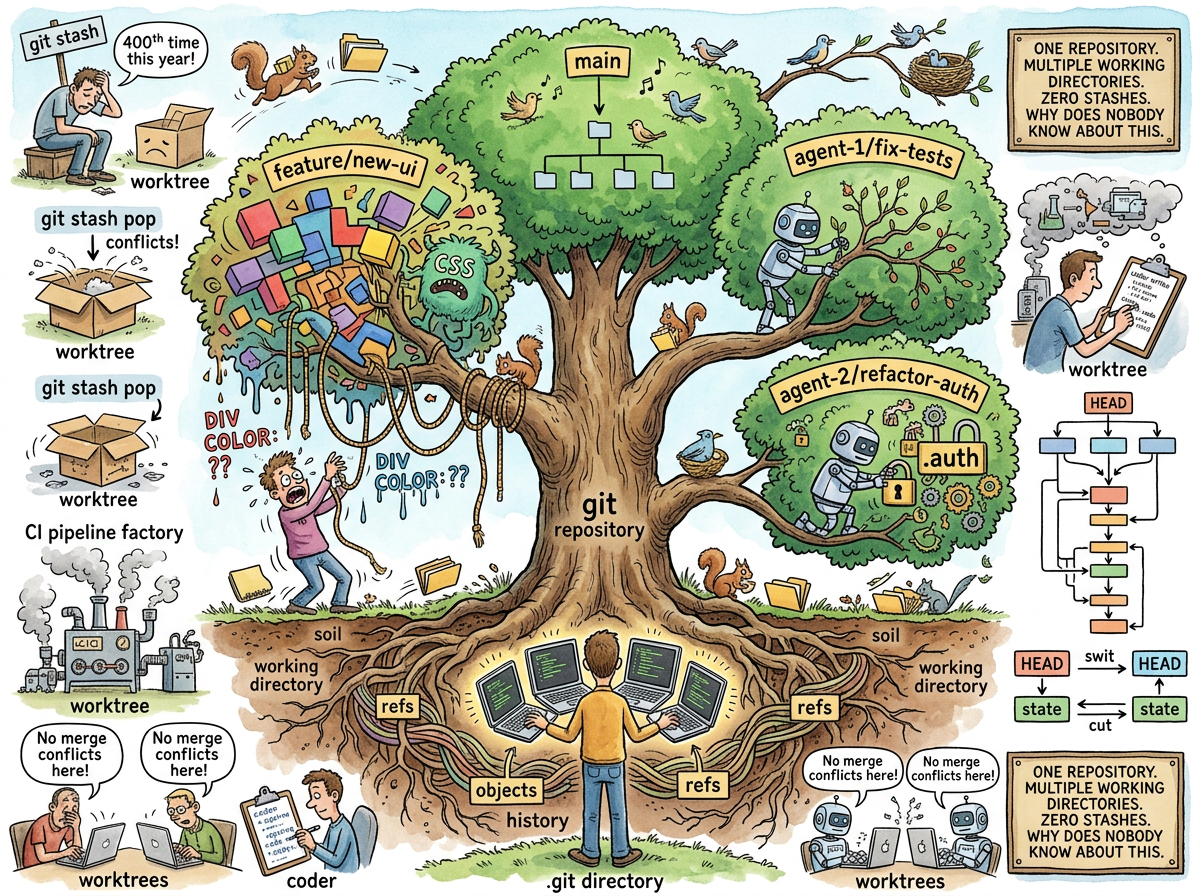
Git worktrees allow you to have multiple working directories attached to the same repository. One repository. Multiple checkouts. Different branches, in different folders, simultaneously, without cloning, without stashing, without losing your mind.
That is the entire explanation. If you have already stopped reading and opened a terminal to try git worktree add, you are the target audience. If you are still reading because that explanation was insufficient, you are the reason this article exists, and you are in the overwhelming majority, because git worktrees have been available since 2015 and the overwhelming majority of developers have never heard of them.
This is the most useful git feature nobody knows exists.
“I have 200+ GitHub repos and four AI agents running in parallel and I have so little git worktree knowledge that I’d rather let them stampede on the same folder.”
— riclib, confessing what every developer with agents has been too embarrassed to admit
The Problem
You are working on a feature branch. Your code is half-written. Uncommitted changes everywhere. Files open in your editor. You are in the zone.
Someone reports a bug in production. You need to check the main branch, reproduce the bug, and fix it. Right now.
Without worktrees, your options are:
-
git stash— Hide your uncommitted work. Switch tomain. Fix the bug. Switch back.git stash pop. Hope the stash applies cleanly. It does not. Spend twenty minutes resolving stash conflicts in code you wrote an hour ago. -
git commit -m "WIP"— Commit your half-written code with a message that haunts the git log forever. Switch tomain. Fix the bug. Switch back. Continue working. The “WIP” commit remains, a permanent monument to the interruption. -
Clone the repo again — Now you have two copies. Two
.gitdirectories. Two copies of the entire history. Two sets of remotes. If you push from one and pull in the other, you are managing two repositories that happen to contain the same code. This is not a solution. This is a lifestyle. -
Tell the person reporting the bug to wait — Viable. Unpopular. Career-limiting if the person is the CEO.
With worktrees, your option is:
git worktree add ../hotfix main
Done. A new directory called hotfix appears next to your project. It contains a checkout of main. Your feature branch is untouched. Your uncommitted changes are untouched. Your editor is untouched. You open a second terminal, cd ../hotfix, fix the bug, commit, push. When you are done: git worktree remove ../hotfix. The directory disappears. Your feature branch never knew.
The Commands
There are four commands. There is nothing else to learn.
git worktree add <path> <branch> — Create a new working directory at <path>, checked out to <branch>. If the branch does not exist, add -b <branch> to create it.
# Check out main in a sibling directory
git worktree add ../hotfix main

# Create and check out a new branch
git worktree add ../experiment -b feature/try-something
git worktree list — Show all worktrees.
$ git worktree list
/home/dev/myproject        abc1234 [feature/new-ui]
/home/dev/hotfix           def5678 [main]
/home/dev/experiment       ghi9012 [feature/try-something]
git worktree remove <path> — Remove a worktree. Deletes the directory. Does not delete the branch.
git worktree prune — Clean up stale worktree references (if you deleted the directory manually instead of using remove).
That’s it. Four commands. The entire feature.
The Agent Problem
In 2025, the world changed. Developers stopped being the only entities writing code. AI agents — Claude, Copilot, Cursor, Aider — began writing code alongside developers, and sometimes alongside each other. A developer with four agents running in parallel has four processes that all want to:
- Check out branches
- Edit files
- Run tests
- Stage and commit changes
If all four agents share one working directory, chaos follows. Agent 1 checks out fix-tests. Agent 2 checks out refactor-auth. Agent 2’s checkout destroys Agent 1’s uncommitted changes. Agent 3 runs tests on code that Agent 4 is currently modifying. The test results are meaningless. The commits are interleaved. The git log looks like four conversations happening simultaneously in the same room.
Worktrees solve this completely:
git worktree add ../agent-1 -b agent/fix-tests
git worktree add ../agent-2 -b agent/refactor-auth
git worktree add ../agent-3 -b agent/update-docs
git worktree add ../agent-4 -b agent/add-feature
Four directories. Four branches. Four agents. Zero collisions. Each agent has its own working directory, its own checkout, its own files to edit, its own tests to run. They share the same .git directory — the same objects, the same history — but they cannot interfere with each other’s working state.
This is the use case that git worktrees were designed for, ten years before the use case existed. In 2015, worktrees were a convenience for developers who wanted to check a different branch without stashing. In 2025, worktrees are infrastructure for parallel agent execution. The feature found its moment.
“The worktree was waiting ten years for the agents. The agents arrived. The developers still don’t know the worktree exists.”
— The Lizard, who does not use version control but appreciates when others use it correctly
How It Works
A git worktree is not a clone. It is a second working directory that shares the same .git directory as the main checkout.
myproject/              ← main worktree
  .git/                 ← the real .git directory (objects, refs, everything)
  src/
  README.md

hotfix/                 ← linked worktree
  .git                  ← a file (not a directory!) pointing to myproject/.git
  src/
  README.md
The linked worktree’s .git is a file, not a directory. It contains one line: gitdir: /path/to/myproject/.git/worktrees/hotfix. All git operations in the linked worktree use the main repository’s object store. No duplication. No sync. One repository, multiple views.
This means:
- Commits in any worktree are visible in all worktrees — they share the same object store
- Branches created in any worktree are visible in all worktrees — they share the same refs
- Disk space is minimal — only the working files are duplicated, not the history
- No pushing/pulling between worktrees — there is nothing to push or pull, they are the same repository
The constraint: you cannot check out the same branch in two worktrees simultaneously. Git prevents this because two worktrees editing the same branch would create the exact collision worktrees are designed to prevent. Different branches, different directories, no conflicts.
The Stash Graveyard
Every developer has a stash graveyard. git stash list reveals the bodies:
stash@{0}: WIP on feature/login: half-done auth
stash@{1}: WIP on main: quick fix attempt
stash@{2}: On feature/old-thing: I'll come back to this
stash@{3}: WIP on main: can't remember what this was
stash@{4}: WIP on feature/login: the other half-done auth
Each stash is a context switch that was handled by hiding work instead of continuing it elsewhere. Each stash is a worktree that was not created. The developer stashed because they did not know about worktrees, and the stash accumulated because stash pop failed, and the failure was not worth debugging at the time, and the stash sat there, and another stash landed on top of it, and now stash@{3} is a mystery from three months ago that nobody will ever resolve.
Worktrees do not replace stash entirely — sometimes a quick stash and pop is the right tool. But for the use case of “I need to work on another branch for a while,” worktrees are the right tool, and stash is the workaround for not knowing the right tool exists.
Measured Characteristics
Git version introduced:                2.5 (2015)
Years available:                       11
Developers who know about worktrees:   ~5%
Developers who would benefit:          ~80%
Commands to learn:                     4 (add, list, remove, prune)
Commands you'll actually use:          2 (add, remove)
Stashes avoided per developer per year: dozens
Agent collisions prevented:            all of them
Disk overhead per worktree:            working files only (history is shared)
Time to create a worktree:             <1 second
Time to explain worktrees:             this article
Time worktrees waited for their moment: 10 years (2015-2025)
The moment:                            AI agents running in parallel
See Also
- Git — The version control system. Five commands for daily use. Worktrees are command six.
- GitHub — The platform. GitHub does not surface worktrees in its UI because worktrees are a local concept and GitHub is a remote concept. The gap is educational.
- Vibe Engineering — The practice of running multiple agents in parallel, by feel, by instinct, by momentum. Worktrees are the infrastructure that makes this not destroy your repository.
- Solo Developer — The developer most likely to have four agents and one checkout. The developer most in need of worktrees. The developer least likely to have heard of them.